
PUBG Anti-Cheat Team Shares New Permanent Ban List: What Every Player Should Know
PUBG: BATTLEGROUNDS' weekly permanent ban list from the Anti-Cheat Team confirms illegal software triggers permanent account loss.
As a dedicated PUBG: BATTLEGROUNDS player, I always keep an eye on the weekly anti-cheat announcements. The newest permanent ban list has just been shared, and honestly, it is a reminder of both progress and ongoing problems. The PUBG: BATTLEGROUNDS Anti-Cheat Team has published another round of permanently banned accounts, and I want to break down what this means for the community, why these weekly posts matter, and how you can protect your own account.
The latest notice covers a recent one-week investigation period, and the anti-cheat team says it shares these lists to raise awareness about the abuse of illegal software and the consequences of misconduct. If you have been following these updates, you know the format: permanently banned accounts are displayed by in-game nickname, but for privacy and security reasons, the first three letters of each nickname are replaced with asterisks. The full list is available through the official notice, but the key message is clear: cheating leads to permanent removal.
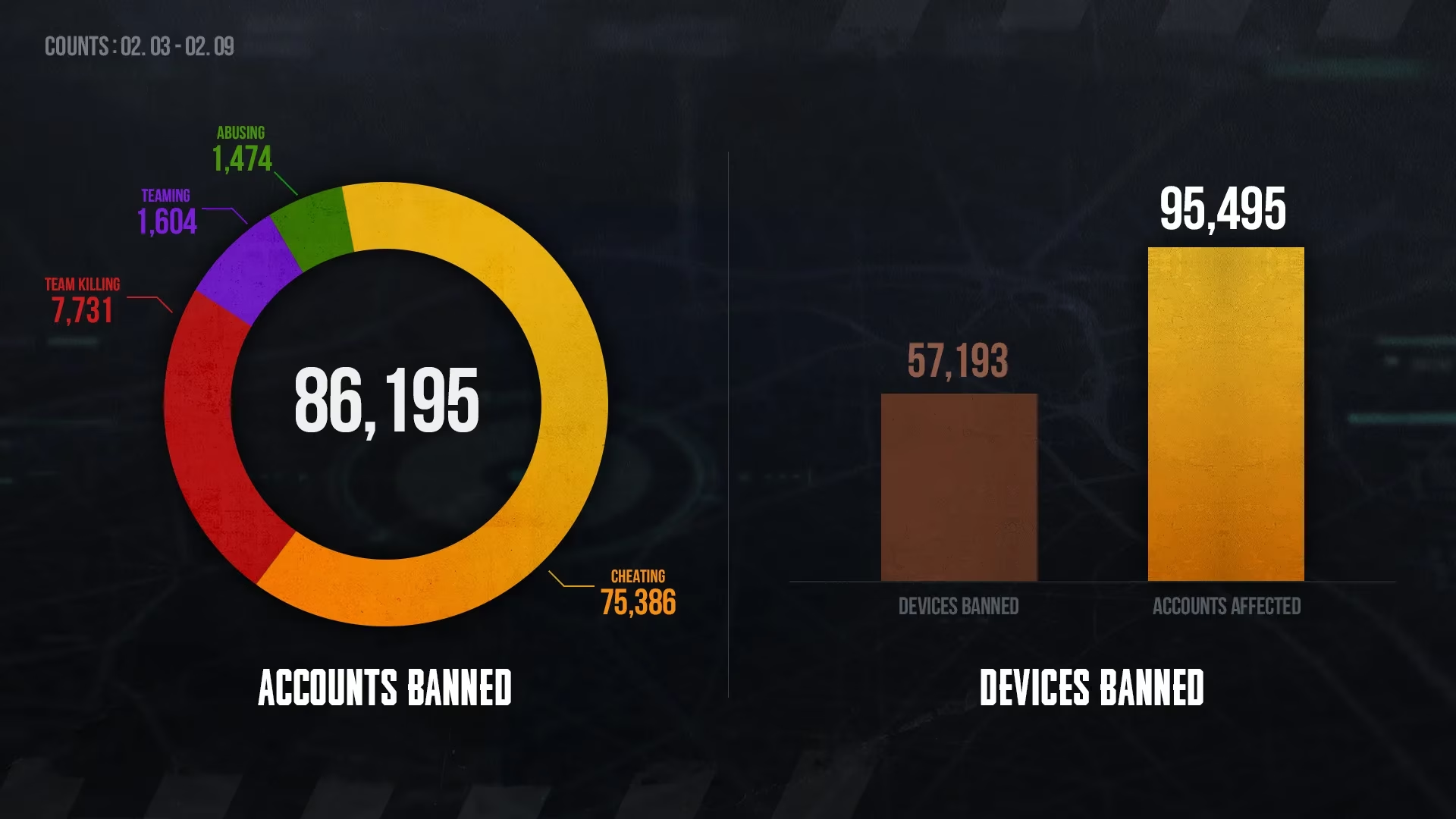
🚫 What Exactly Happens to Banned Accounts?
Permanent bans are not temporary suspensions. When an account is permanently banned for using illegal software or for misconduct, it loses access to PUBG: BATTLEGROUNDS for good. For many players, that means hundreds or even thousands of hours of progression, skins, medals, and seasonal rewards are gone in an instant. Does anyone really think a subtle aimbot or recoil script is worth that risk? I have seen too many players complain after the fact, but the anti-cheat team consistently warns that the cost of cheating is permanent loss.
The ban list itself is not just a public shaming tool. By publishing nicknames with partial masking, the team provides transparency while still respecting account privacy. It also sends a strong signal to the community that reports are being reviewed and action is being taken.
| Element | Details |
|---|---|
| Review period | Weekly investigation window |
| Ban type | Permanent account ban |
| Reason | Illegal software or misconduct |
| Nickname display | First three characters replaced with "*" |
| Primary report method | In-game report first |
| Additional support | PUBG Support |
📋 Why Should Fair Players Care About This Weekly List?
This weekly disclosure is not only for victims of cheating. It is also a warning. The anti-cheat team specifically reminds players that valuable accounts can be abused or banned if they fall into the wrong hands. A common mistake is sharing account details or ignoring security settings. If someone uses your account to cheat, you are the one who faces the ban. Is a borrowed account or a shared password really worth losing everything?
That is why the notice repeats one of the most important pieces of advice: sign up for Steam Guard Mobile Authenticator. This adds an extra layer of protection to your Steam account, which is directly linked to PUBG: BATTLEGROUNDS. Without it, your account is far more vulnerable to unauthorized access.
🛡️ How to Set Up Steam Guard Mobile Authenticator
The official notice points players toward Steam Guard Mobile Authenticator setup instructions. If you have not activated it yet, you should stop reading this for a moment and check your Steam security settings. Here is a general walkthrough:
-
Open the Steam Mobile App on your phone.
-
Sign in to your Steam account.
-
Tap the Steam Guard option in the app menu.
-
Select Add Authenticator and follow the phone number verification steps.
-
Enter the SMS code you receive.
-
Save your recovery code somewhere safe, not just on your phone.
-
Confirm the setup and keep the app installed for future login approvals.
This small setup can prevent a lot of heartbreak. The anti-cheat team makes this recommendation because compromised accounts are often used to run illegal software, and the original owner ends up permanently banned.
✅ How Should You Report Illegal Software or Misconduct?
The first step is always to use the in-game report function. This gives the anti-cheat team direct match data and makes it easier to verify suspicious behavior. If you need additional assistance, the notice directs players to contact PUBG Support through the official support system. Do not rely only on social media posts or clips; those can help raise awareness, but official reports create actionable cases.
I know reporting can feel like shouting into the void, especially when you face another suspicious player the very next match. But every report adds to the behavioral data that helps improve detection. The anti-cheat team explicitly states that it values player interest and opinions that contribute to PUBG's anti-cheat efforts.
🎯 Final Thoughts
This latest ban list is another proof that no account is safe if it cheats. It also shows that the anti-cheat team is still actively cleaning up the game. As a player, I feel encouraged by the transparency, but I also know that enforcement alone will not solve everything. We all have a role to play: keep our accounts secure, report misconduct through official channels, and refuse to tolerate cheating in any form.
The PUBG: BATTLEGROUNDS Anti-Cheat Team promises to do its best to provide a fair gaming environment. I hope the weekly lists keep coming, and I hope they eventually get shorter. Until then, secure your account, report suspicious behavior, and leave the illegal software to those who are willing to lose everything.